
Airway case review for EMS
Airway QA/QI video review for EMS intubation
Medical directors need intubation video in a review they can actually run: captured on the call, opened by authorized users, documented with notes and a checklist, and rolled up into department trends.
The IntuBlade app can capture procedure media on a compatible USB-C phone or tablet and route it into the Admin Portal for that workflow.
No product ships from the evaluation form.
01
The buyer gap this page answers
Public EMS preference pages and search results for recorded-video feedback often cite GlideScope and C-MAC systems. IntuBlade has been absent from those pages.
That is a search-result observation about what buyers see, not a clinical ranking and not a claim about patient outcomes. IntuBlade does not claim a ranking in independent EMS surveys.
02
What a usable EMS QA/QI path needs
A recorded attempt that never reaches structured review does not help the medical director. Evaluate the whole path, not the camera alone.
Capture without extra mid-resus steps
The record has to start from the same setup the clinician already uses to get a view.
Secure authorized review
Procedure media should reach people the department has authorized, not a shared inbox.
Notes, checklist, flags, and coaching
Reviewers need a place to document the attempt, mark follow-up, and coach the next shift.
Department trends
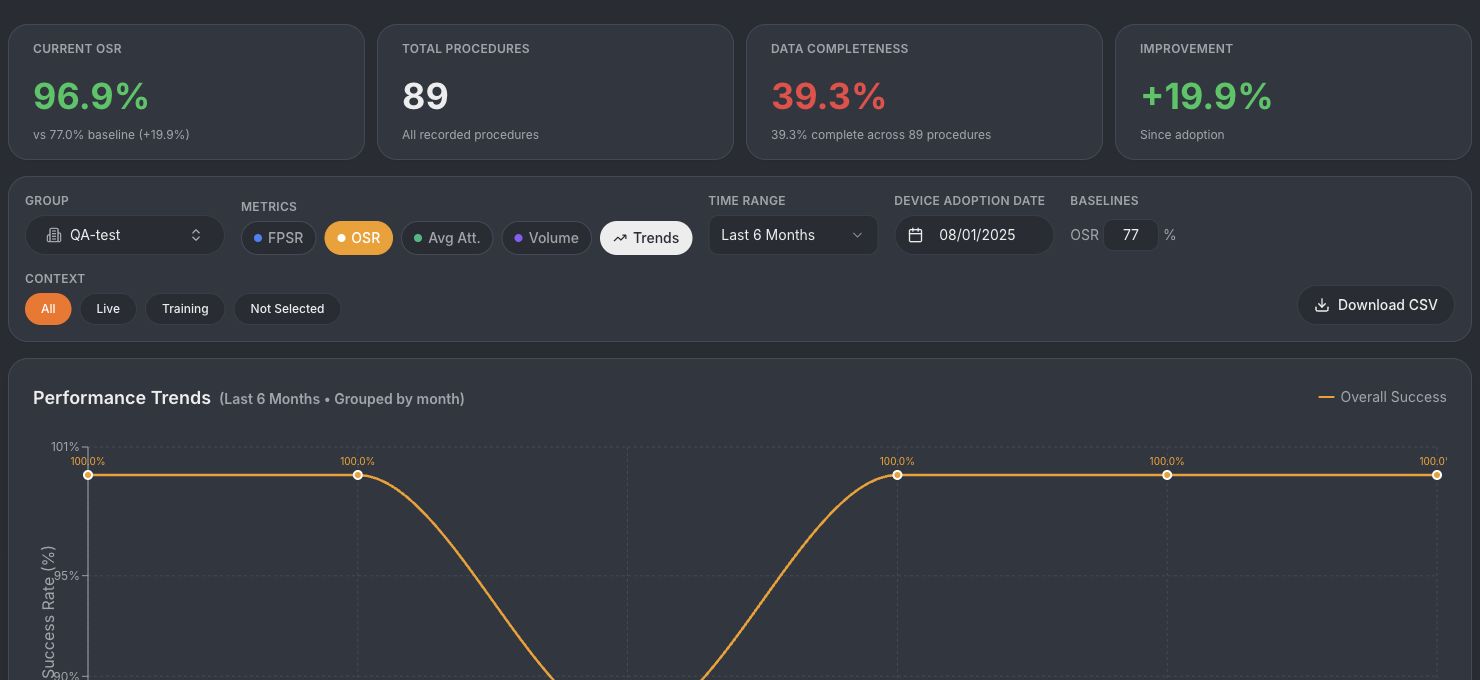
Leadership needs volume, review completion, and outcome metrics, not a pile of files.
Training use
The same workflow should support skills review and scenario debrief without a second system.
03
How IntuBlade fits that workflow
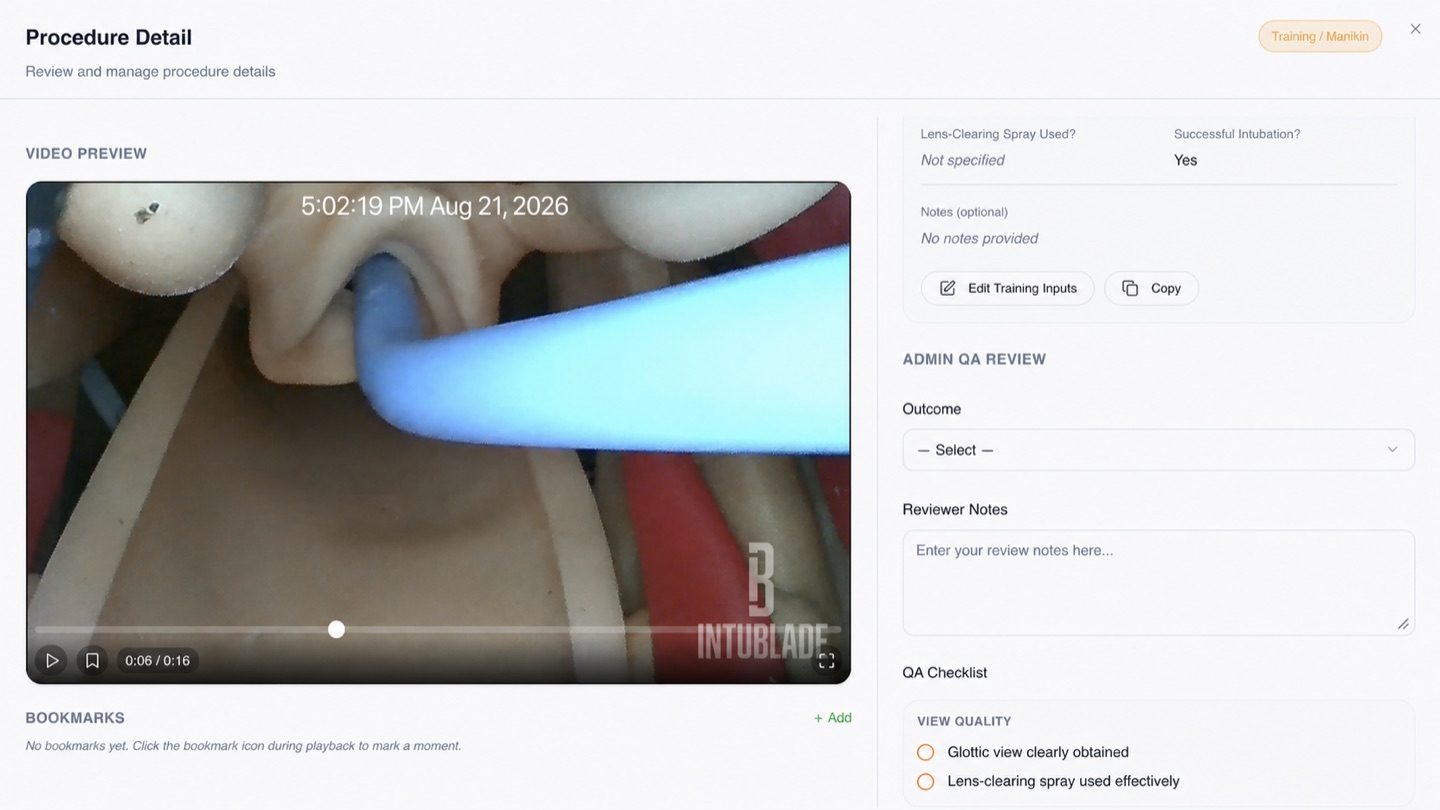
IntuBlade is a single-use Macintosh video laryngoscope. It plugs into a compatible USB-C phone or tablet. The IntuBlade app can capture procedure media and route it into the Admin Portal. Authorized users can review procedure media, outcomes, notes, a QA checklist, flags, and department metrics.
- Compatible USB-C phone or tablet plus the IntuBlade app can capture procedure media
- The record can route into the Admin Portal for QA/QI
- Authorized users can review procedure media, outcomes, notes, a QA checklist, and flags
- Department metrics can show review completion, procedure volume, and performance trends
Use the Security, Privacy, DPA, and HIPAA resources to review safeguards, roles, data handling, and BAA eligibility for your organization. A Business Associate Agreement applies automatically to HIPAA Cloud accounts.
04
Who this evaluation is for
- EMS and fire medical directors who want intubation video in structured QA/QI review
- Agencies that can capture on a compatible USB-C phone or tablet
- Training leads who want reviewable attempts for coaching
05
Who should keep looking elsewhere
- Programs that require an FDA cleared or approved VL claim. IntuBlade is FDA registered, Class I, 510(k)-exempt, Rx Only. Not FDA cleared or FDA approved.
- Teams that will not use a compatible USB-C phone or tablet as the display
- Programs that will not assign authorized reviewers for procedure media
Common questions
How do EMS medical directors get intubation video into QA/QI?
A usable path captures the attempt from the same device workflow used on the call, then routes the record to authorized reviewers. In the IntuBlade workflow, the app can capture procedure media and send it into the Admin Portal for notes, a QA checklist, flags, and department metrics.
Does the Admin Portal show real procedure media?
The portal is designed to associate procedure media with the case record. Public screenshots on this site are sanitized training records or illustrative internal test data.
Can reviewers add notes and outcomes?
Yes. The case-review screen includes outcome selection, reviewer notes, and a structured QA checklist.
What should security reviewers inspect?
Use the Security, Privacy, DPA, and HIPAA resources to review safeguards, roles, data handling, and BAA eligibility for your organization.
Next step
A department evaluation maps compatible USB-C devices, Macintosh sizes, capture workflow, authorized review, and rollout before a fleet decision.
No product ships from the evaluation form. IntuBlade is FDA registered, Class I, 510(k)-exempt, Rx Only. Not FDA cleared or FDA approved.